Your Google Business Profile is often the first impression potential customers have of your business.
Before they visit your website, make a phone call, or request a quote, they’re likely to look at your photos.
That’s why choosing the right Google Business Profile photos is so important.
High-quality, up-to-date images help build trust, showcase your professionalism, and encourage more people to contact your business. While many businesses focus on reviews and business information, photos are often overlooked despite playing a key role in customer decision-making.
In this guide, we’ll explain which GBP images you should upload, why they matter, and how they can help your business stand out in Google Search and Google Maps.
Why Google Business Profile Photos Matter
People are naturally drawn to visual content.
When customers search for a local business, they often compare several profiles before deciding who to contact.
A profile with professional, engaging photos immediately creates a stronger impression than one with only a logo or a handful of outdated images.
Well-chosen photos can help you:
- Build trust with potential customers
- Showcase the quality of your work
- Demonstrate that your business is active
- Increase engagement with your profile
- Encourage more website visits and phone calls
Photos don’t just make your profile look better. They help customers feel more confident about choosing your business.
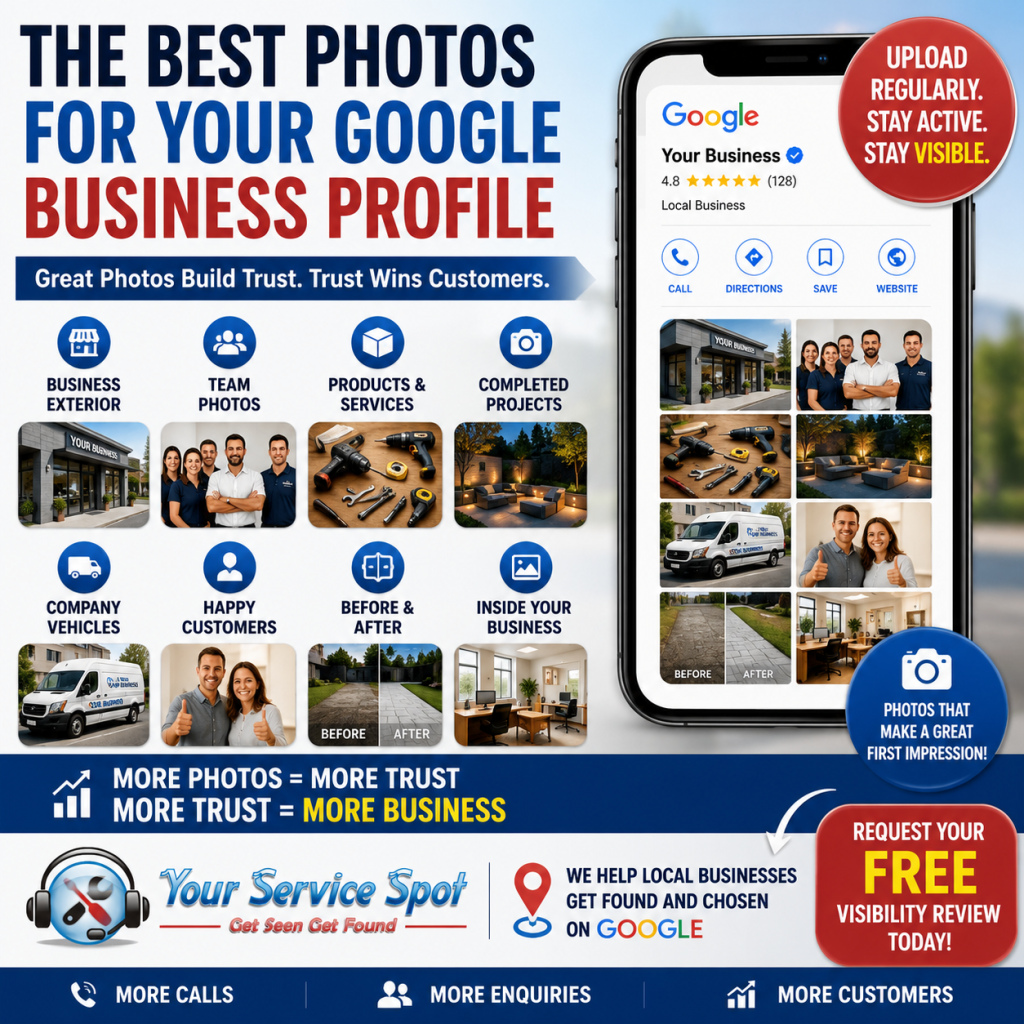
What Types of Photos Should You Upload?
A varied collection of images gives customers a better understanding of your business.
Here are the most valuable types of Google Business Profile photos.
-
Exterior Photos
Help customers recognise your premises by uploading clear photographs of the outside of your building.
Include:
- Front entrance
- Signage
- Parking areas
- Different angles
- Daytime and evening views if appropriate
This is especially useful for businesses with physical premises that customers visit.
-
Interior Photos
Give customers a feel for your business before they arrive.
Examples include:
- Reception area
- Office
- Showroom
- Waiting area
- Workshop
- Retail displays
A clean, welcoming environment builds confidence.
-
Team Photos
Customers like to know who they’ll be dealing with.
Upload professional but friendly photographs of:
- Business owners
- Staff members
- Engineers
- Advisors
- Customer service team
Businesses with real people often appear more approachable than those relying only on logos.
-
Products
If you sell physical products, showcase them clearly.
Use high-quality images showing:
- Best-selling products
- New arrivals
- Seasonal products
- Product displays
Avoid cluttered backgrounds where possible.
-
Completed Projects
For service businesses, completed work is one of the strongest trust builders.
Examples include:
- Landscaping projects
- Kitchen installations
- Website designs
- Pool cleaning results
- Before-and-after images
- Drain repairs
These photos demonstrate real results rather than making claims.
-
Company Vehicles
Branded vehicles reinforce professionalism and help customers recognise your team when they arrive.
Include:
- Vans
- Service vehicles
- Delivery vehicles
- Fleet photos
These images also strengthen brand recognition.
-
Equipment
Show customers that you use professional tools and equipment.
Examples include:
- Specialist machinery
- Diagnostic equipment
- Workshop tools
- Cleaning equipment
This helps demonstrate expertise and investment in your business.
-
Customers (With Permission)
Photos featuring satisfied customers can be powerful trust signals.
Examples include:
- Product handovers
- Completed installations
- Happy clients
- Award presentations
Always obtain permission before publishing customer photos.
-
Before-and-After Photos
These are particularly effective for businesses offering visible transformations.
Examples include:
- Cleaning services
- Home improvements
- Landscaping
- Decorating
- Vehicle detailing
- Pet grooming
Before-and-after images quickly demonstrate the value of your work.
-
Behind-the-Scenes Photos
Customers appreciate seeing the human side of your business.
Share images of:
- Staff preparing for the day
- Projects in progress
- Team meetings
- Community events
- Charity work
These help your business feel authentic and approachable.
How Often Should You Upload New Photos?
A common question is:
“How often should I add new photos?”
A good target is:
- 1 to 3 new photos every week
If that’s not practical, aim to upload at least a few fresh images each month.
Regular updates help keep your profile looking active and current.
Tips for Better Google Business Profile Photos
To make the biggest impact:
Use High-Resolution Images
Avoid blurry or pixelated photos.
Use Natural Lighting
Well-lit images appear more professional.
Keep Photos Current
Remove outdated images that no longer represent your business.
Show Real Work
Authentic photographs usually perform better than generic stock images.
Add Variety
Include different types of photos rather than uploading similar images repeatedly.
Common Photo Mistakes
Avoid these common issues:
- Only uploading a logo
- Using low-quality images
- Never updating photos
- Posting irrelevant pictures
- Over-editing images
- Ignoring seasonal updates
A neglected photo gallery can make a business appear inactive.
How Photos Support Local SEO
While Google Business Profile photos aren’t the only ranking factor, they support your overall local SEO strategy by:
- Increasing customer engagement
- Improving profile quality
- Building trust
- Encouraging profile interactions
- Helping customers choose your business
Combined with reviews, regular Google Business Profile posts, accurate business information, and website optimisation, photos contribute to a stronger online presence.
How Your Service Spot Can Help
Many businesses know they should update their profile but simply don’t know where to start.
At Your Service Spot, we help businesses optimise every aspect of their Google Business Profile, including:
- Photo optimisation
- Google Business Profile posts
- Review strategies
- Business information updates
- Local SEO
- Google Maps optimisation
Our goal is to help your business create a professional first impression that encourages more customers to get in touch.
Get Your FREE Visibility Review
Not sure whether your Google Business Profile is helping your business attract customers?
We’ll review your profile and identify practical improvements, including recommendations for your photos, content, reviews, and local SEO.
Contact Your Service Spot today for your FREE Visibility Review and discover how better Google Business Profile photos can help your business stand out from the competition.
Frequently Asked Questions
Do Google Business Profile photos improve rankings?
Google hasn’t confirmed that photos are a direct ranking factor. However, regularly updating your profile with high-quality images helps keep it active, improves customer engagement, and supports a strong local SEO strategy.
How many photos should I upload to my Google Business Profile?
There’s no fixed number, but aim to build a varied gallery over time. Uploading one to three new photos each week, or several each month, helps keep your profile fresh.
What are the best Google Business Profile photos to upload?
Start with exterior and interior photos, team members, products, completed projects, company vehicles, and before-and-after images where appropriate.
Can I use stock photos?
It’s better to use authentic photos of your own business. Real images build more trust and accurately represent the experience customers can expect.
What image size works best?
Use high-resolution images that are clear, well-lit, and in focus. Avoid heavily compressed or blurry photos.
Should I remove old photos?
If they no longer represent your business, services, branding, or premises, it’s a good idea to replace them with more recent images.