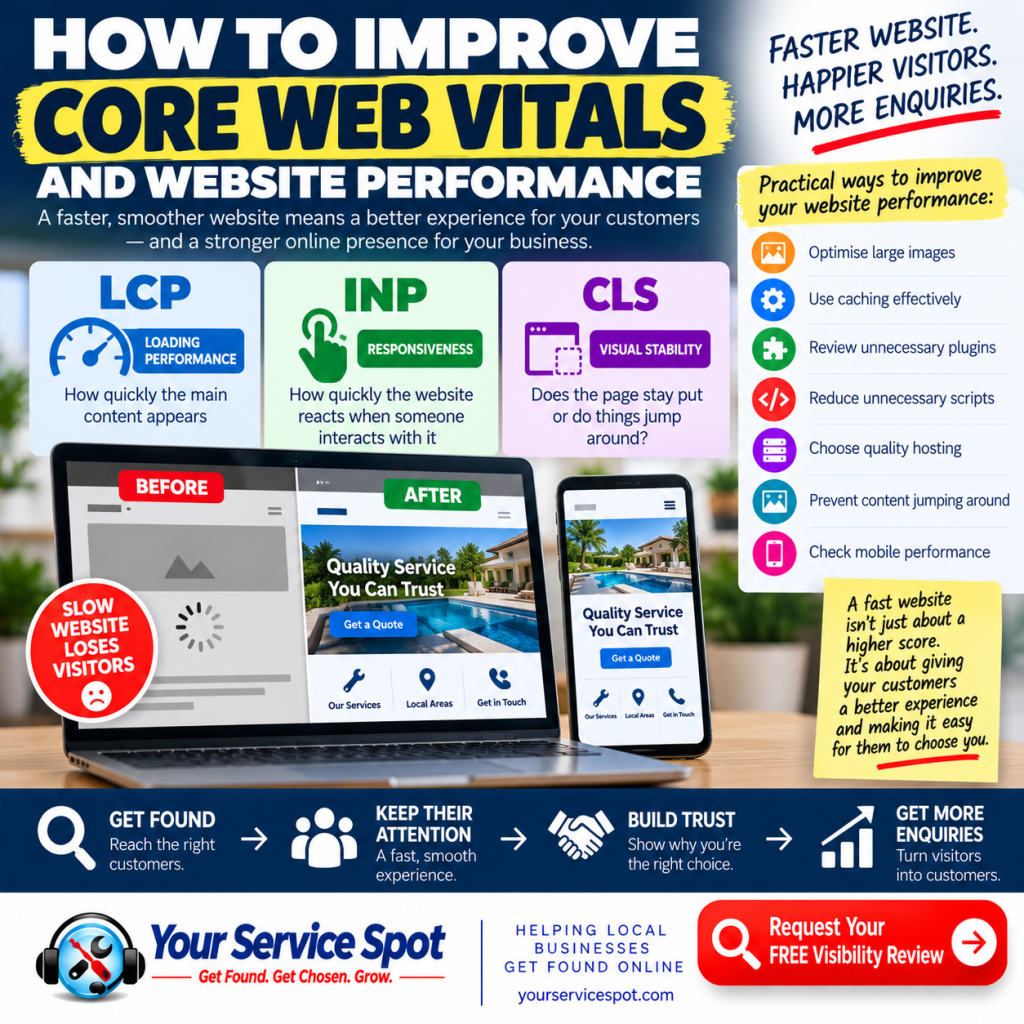
How to Improve Core Web Vitals and Website Performance
Your website might look great.
But how does it feel to use?
- Does it load quickly (it’s not just about your home page)?
- Can visitors interact with it without waiting?
- Does the page remain stable while it loads — or do buttons, images and text suddenly move around?
These aspects of website performance affect the experience potential customers have when they visit your site.
Google’s Core Web Vitals provide a way of measuring three important parts of that experience: loading performance, responsiveness and visual stability.
For a local business, this isn’t simply a technical SEO exercise.
A potential customer who has already found your business and clicked through to your website shouldn’t have to fight with the site before they can contact you.
Let’s look at what Core Web Vitals are, what can cause problems and some practical ways to improve them.
What Are Core Web Vitals?
Core Web Vitals are metrics Google uses to assess important aspects of real-world webpage experience.
The three current Core Web Vitals are:
1. Largest Contentful Paint (LCP)
LCP measures loading performance.
In simple terms, it looks at how long it takes for the main visible content of a page to appear.
Google considers an LCP of 2.5 seconds or less to be good.
A slow LCP can be caused by things such as:
- Large images
- Slow server response
- Render-blocking resources
- Heavy website themes
- Unnecessary scripts
If a potential customer opens your website and spends several seconds looking at an incomplete page, you’ve created friction before they’ve even started reading.
2. Interaction to Next Paint (INP)
INP measures responsiveness.
It assesses how quickly a page responds when somebody interacts with it — for example, by clicking, tapping or using a control.
Google’s good threshold for INP is 200 milliseconds or less.
Have you ever clicked something on a website and wondered whether anything happened?
That’s the type of frustrating experience responsiveness improvements are designed to reduce.
3. Cumulative Layout Shift (CLS)
CLS measures visual stability.
You’ve probably experienced this one.
You’re about to tap a button when an image suddenly loads and moves everything down the page.
You tap the wrong thing instead.
Annoying, isn’t it?
CLS measures unexpected movement of page content while somebody is using it.
Google considers a CLS score of 0.1 or less to be good.
The objective is straightforward:
Keep the page stable while it loads.
Why Do Core Web Vitals Matter?
It’s tempting to think of Core Web Vitals as something only web developers need to worry about.
They’re more important than that.
They relate directly to the experience your customers have when using your website.
Good website performance can help create:
- Faster access to information
- Smoother interaction
- Better mobile usability
- Less frustration
- Greater confidence in your website
- An easier route towards making an enquiry
Google also uses Core Web Vitals as part of its broader page-experience considerations.
However, don’t make the mistake of thinking that achieving perfect technical scores will automatically send your website to the top of Google.
SEO involves many factors.
Relevant, useful content and a website that satisfies what the searcher needs remain enormously important.
Think of Core Web Vitals as one part of building a better-performing website, rather than a magic ranking formula.
-
Optimise Your Images
Images are one of the first places I’d look when investigating poor website performance.
A local business website might contain:
- Team photographs
- Completed projects
- Product images
- Service photographs
- Background images
- Before-and-after pictures
These can be excellent for demonstrating trust and experience.
But uploading unnecessarily large image files can slow a website considerably.
What can you do?
Resize images to appropriate dimensions before displaying them.
Compress files where practical.
Use suitable modern image formats such as WebP or AVIF when appropriate.
Consider lazy loading images that don’t need to appear immediately.
And don’t upload a huge photograph straight from a camera or phone if it’s only going to appear as a relatively small image on the webpage.
The goal isn’t to remove useful photographs.
It’s to deliver them efficiently.
-
Improve Your Hosting and Server Performance
Sometimes the problem isn’t the webpage itself.
It’s the infrastructure delivering it.
Slow server response can affect how quickly visitors begin receiving the page.
Quality hosting, sensible server configuration, caching and an appropriate content delivery setup can all contribute to better performance.
For a small business owner, the important question isn’t:
“Do I have the cheapest hosting package?”
It’s:
“Is my hosting providing the performance and reliability my website needs?”
Cheap hosting that regularly produces a slow website may prove expensive if potential customers leave.
-
Use Caching Effectively
Caching can reduce the amount of work required to deliver pages to visitors.
Rather than rebuilding or retrieving everything from scratch each time, appropriately configured caching can allow content to be served more efficiently.
Depending on your website setup, this can include:
- Page caching
- Browser caching
- Server-level caching
- Object caching
- CDN caching
But don’t simply install multiple caching and optimisation plugins and hope for the best.
Overlapping tools can sometimes create conflicts or unexpected website behaviour.
Use an approach that’s appropriate for your hosting environment and website platform.
-
Remove Unnecessary Plugins
This is particularly relevant to WordPress websites.
Plugins are useful.
But over time, websites can accumulate plugins that:
- Are no longer required
- Duplicate another plugin’s functionality
- Load unnecessary resources
- Haven’t been properly maintained
- Add scripts to pages where they’re not needed
Review your plugins periodically.
Ask:
Do we still need this?
Don’t remove plugins blindly, particularly on a live business website.
But if something serves no useful purpose, there may be little benefit in continuing to load and maintain it.
-
Reduce Unnecessary JavaScript
Modern websites can rely heavily on JavaScript.
Some is essential.
Some isn’t.
Third-party scripts may come from:
- Analytics platforms
- Advertising systems
- Chat widgets
- Tracking tools
- Social media integrations
- Booking systems
- Embedded services
- Marketing software
Individually they may seem harmless.
Collectively they can add considerable work for a visitor’s browser.
Review what your website loads and whether each component provides enough business value to justify its performance cost.
-
Prevent Images From Moving the Page Around
Remember CLS?
One way to reduce unexpected layout shifts is to ensure the browser knows how much space page elements require before they’ve fully loaded.
Images and embedded content should generally have appropriate dimensions or reserved space.
Otherwise, the browser may initially position text or buttons in one place and then move them when an image appears.
This isn’t just about satisfying a metric.
Imagine a customer trying to press:
CALL NOW
only for the button to move at the last second.
That’s a poor customer experience.
-
Be Careful With Fonts
Custom fonts can make a website look distinctive.
But they can also contribute to performance problems if implemented inefficiently.
Consider:
- How many font families you really need
- How many font weights you’re loading
- Whether fonts are being loaded efficiently
- Whether unnecessary font files can be removed
Your visitors probably won’t abandon your business because you’ve reduced the number of font variations.
They might abandon a painfully slow website.
-
Prioritise What Visitors See First
Not every resource on a webpage is equally important.
The content visible when somebody first arrives should generally receive priority over something far down the page that they may never see.
This is where techniques such as lazy loading can help.
For example, an image near the bottom of a long article may not need to load immediately.
But the main content at the top of the page probably does.
The principle is simple:
Load what the visitor needs first.
-
Check Your Mobile Website
Never assume your website works well on mobile simply because it looks good on your laptop.
Pick up your phone and use it.
Check:
- How quickly pages appear
- Whether menus work properly
- Whether text is readable
- Whether buttons respond quickly
- Whether elements jump around
- Whether forms are easy to complete
- Whether phone numbers are easy to tap
- Whether important information appears quickly
For a local business, somebody searching on their phone may be ready to contact a business immediately.
Don’t put unnecessary barriers between the search and the enquiry.
-
Improve the Website — Don’t Just Chase a Score
This is perhaps the most important point in this article.
Performance tools produce scores.
Scores are useful for identifying problems and monitoring improvements.
But your customer is not a performance score.
A technically fast website with poor content, confusing navigation and no clear call to action isn’t a successful business website.
Equally, removing every useful feature just to improve a laboratory score could make the website less valuable.
Your goal should be to create the best balance of:
SPEED + CONTENT + USABILITY + TRUST + CONVERSION
That’s what good website optimisation should be about.
How Can You Check Your Core Web Vitals?
One of the easiest places to start is Google’s PageSpeed Insights.
Enter a webpage URL and the tool can provide information about performance and highlight possible opportunities for improvement.
Google Search Console can also provide Core Web Vitals information across groups of pages on your website when sufficient data is available.
When reviewing results, remember that there can be a distinction between:
Field data — information based on real-user experiences where available.
and
Lab data — testing performed under controlled conditions.
Both can be useful, but they aren’t necessarily measuring exactly the same thing.
What Is a Good Core Web Vitals Score?
Google’s recommended “good” thresholds are:
| Core Web Vital | What it measures | Good threshold |
| LCP | Loading performance | ≤ 2.5 seconds |
| INP | Responsiveness | ≤ 200 ms |
| CLS | Visual stability | ≤ 0.1 |
Google assesses these thresholds using the 75th percentile of page loads, segmented across mobile and desktop devices.
Don’t worry if that sounds technical.
For most business owners, the takeaway is much simpler:
Your website should load quickly, respond promptly and remain visually stable for the majority of visitors.
Core Web Vitals and SEO: Keep Them in Perspective
Can improving Core Web Vitals help your website?
Yes.
Should you ignore poor website performance?
No.
But should you spend weeks chasing a tiny improvement in a performance score while your website has weak service pages, unclear messaging and no useful location content?
Probably not.
SEO works best when you consider the complete customer journey.
A potential customer needs to:
FIND YOU
↓
REACH YOUR WEBSITE
↓
GET THE INFORMATION THEY NEED
↓
TRUST YOUR BUSINESS
↓
TAKE ACTION
Core Web Vitals can help make that journey smoother.
They don’t replace the rest of it.
Common Core Web Vitals Mistakes
Before finishing, here are some mistakes worth avoiding:
❌ Uploading unnecessarily huge images
❌ Installing optimisation plugins without understanding what they do
❌ Running several tools that perform the same caching function
❌ Loading unnecessary third-party scripts
❌ Ignoring mobile performance
❌ Focusing exclusively on the homepage
❌ Chasing a perfect score instead of improving the user experience
❌ Making major technical changes without backing up and testing the website
And one particularly important website SEO mistake:
Assuming a fast website automatically means good SEO.
Performance matters.
But so do content, relevance, structure, authority, usability and conversion.
Better Website Performance Can Mean a Better Customer Experience
Think about Core Web Vitals from your customer’s perspective.
They don’t know your LCP.
They don’t care what your INP score is.
They’ve probably never heard of CLS.
They simply know:
“This website loaded quickly.”
“I found what I needed.”
“Everything worked.”
“It was easy to contact them.”
That’s the outcome we’re really trying to achieve.
Your website should help move potential customers through a simple journey:
GET FOUND → KEEP THEIR ATTENTION → BUILD TRUST → MAKE THE NEXT STEP EASY
Could Poor Website Performance Be Costing You Enquiries?
You may have already done the difficult part.
A potential customer found your business.
They clicked your website.
Don’t lose them because the website is slow, frustrating or difficult to use.
At Your Service Spot, we help businesses identify opportunities to improve their websites, Google presence and overall online visibility.
Request Your FREE Visibility Review
Find out where your website and online presence could be improved.
Get Found. Get Chosen. Grow.
Frequently Asked Questions About Core Web Vitals
What are Core Web Vitals?
Core Web Vitals are Google metrics designed to measure important aspects of webpage experience. The current metrics are Largest Contentful Paint (LCP) for loading performance, Interaction to Next Paint (INP) for responsiveness and Cumulative Layout Shift (CLS) for visual stability.
What is a good LCP score?
Google’s good threshold for Largest Contentful Paint is 2.5 seconds or less.
What is a good INP score?
An Interaction to Next Paint result of 200 milliseconds or less is considered good by Google.
What is a good CLS score?
Google considers a Cumulative Layout Shift score of 0.1 or less to be good.
Do Core Web Vitals affect SEO?
Core Web Vitals form part of Google’s broader assessment of page experience. However, they should not be viewed as a shortcut to higher rankings. Relevant content, search intent and other local SEO factors remain important.
How can I improve my Core Web Vitals?
Common improvements include optimising images, improving hosting and server performance, configuring caching correctly, reducing unnecessary JavaScript, reviewing plugins, reserving space for images and embeds, and improving mobile performance.
How do I test my website’s Core Web Vitals?
Google PageSpeed Insights is a useful starting point for individual pages. Google Search Console can also report Core Web Vitals information for your website when sufficient real-user data is available.
Why are my mobile Core Web Vitals worse than desktop?
Mobile visitors may use slower devices or connections, and responsive layouts can behave differently from desktop versions. That’s why it’s important to evaluate the actual mobile experience rather than assuming desktop performance represents everybody.
Should I aim for a perfect PageSpeed score?
A perfect score isn’t the business objective. Use performance tools to identify genuine problems, but concentrate on providing visitors with a fast, stable and useful website that makes it easy to take the next step.
Can WordPress plugins improve Core Web Vitals?
Performance and caching plugins can help when configured appropriately, but installing multiple overlapping optimisation plugins can create problems. The right solution depends on the website, hosting environment and causes of poor performance.